14 November 2026 · 4 min read
How to Zoom In on a Video and Keep It Sharp
How far can you zoom into a video before it goes soft? Here is the real limit, how to make a push in feel natural, and how to zoom on a computer or phone.
You want to push in on a face, or lose something ugly at the edge of the frame. So you raise the scale, and the picture goes soft. Edges blur, skin turns waxy, and text in the background melts.
Finding the zoom control is easy in any editor. The part worth learning is how far you can go before it looks bad. And how to make the move feel like a camera rather than an effect.
Why zooming softens the picture
When you scale a clip to 120 percent, the editor doesn't find new detail. It stretches the pixels you already have over a bigger area, and guesses the ones in between. Those guesses are smooth rather than sharp. A little stretching hides well, but a lot of it looks like a photo blown up too far.
My limit with same size footage
Say my footage and my project are the same size, such as full HD in a full HD project. Then I don't zoom past about 10 to 12 percent. Beyond that the drop in quality becomes visible. It's a number from my own editing rather than a law, so test your own footage. A soft background or a moving shot forgives more. A sharp, still shot full of fine texture shows the stretch straight away.
Spare pixels change everything
A 4K clip is twice the width and twice the height of full HD. In a full HD project, that means you can zoom up to two times before you stretch a single pixel. In Premiere Pro, a 4K clip fitted to a full HD sequence shows at 50 percent. Scaling it back to 100 percent is a two times zoom, and it's still sharp.
I shoot 4K for 1080p delivery when I want freedom in the edit. It lets me crop slightly or add a slow move. But I treat it as a safety margin, never as a plan.

Don't shoot wide and hope
Some people shoot loose on purpose and plan to find the frame later. I don't, and I wouldn't recommend it. The lens, the distance, the background and how the subject sits in the frame are decisions you make with the camera. Cropping later rarely gets you the same result, and relying on it stops you thinking about composition on set. Learn to frame while you shoot. It takes practice, and you improve with every shoot.
A push in that feels like a camera
There are really three kinds of zoom in an edit. A static crop holds one tighter frame for the whole clip. A punch in cuts from the normal frame to a tighter version of the same shot. Editors often use it to hide a cut in a talking head. And a slow push in grows gradually during the shot, which is the one people get wrong.
Keep it small. Eight to ten percent over several seconds feels like a camera drifting closer. Fifty percent in one second feels like a slideshow. Let it run across most of the shot, and ease the start and end so it never jerks. Move towards something that matters, such as the eyes or a hand.
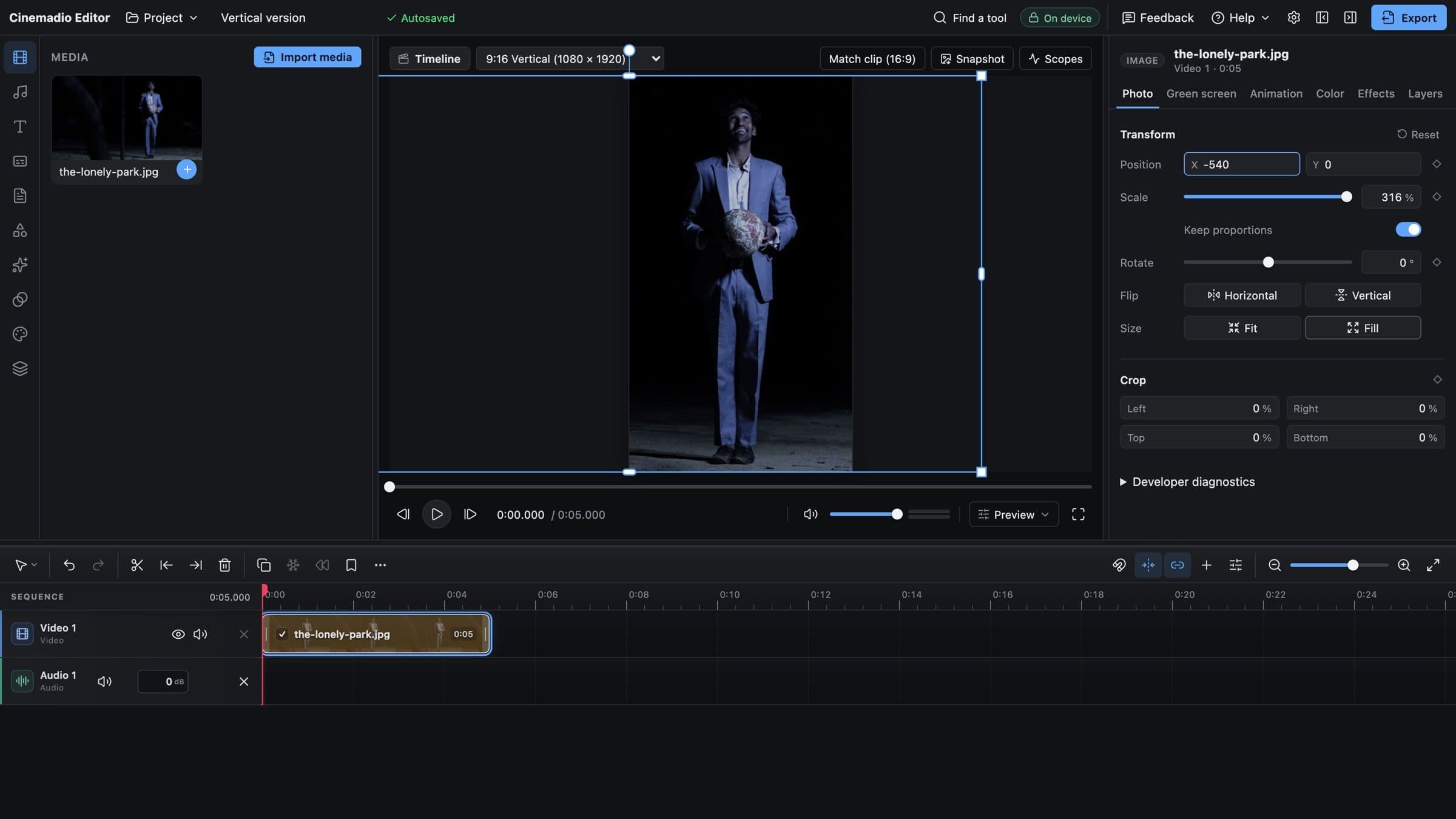
The controls are always scale and position, under different names. In Premiere Pro, they sit under Motion in Effect Controls, and the stopwatch next to Scale starts the keyframes. In DaVinci Resolve, look in the Inspector under Transform for Zoom and Position, with a small diamond beside each one. In CapCut, pinch the clip in the preview and tap the diamond to keyframe it.
On an iPhone, the Photos app can do a static crop. Tap Edit, choose the crop tool and pinch outwards. For a moving zoom on a phone, you'll need an editing app with keyframes. Phone footage also has less spare detail than you'd expect, especially in low light.
Check before you commit
Look at the zoomed frame at full size, not in a small preview, because softness hides when the picture is small. Resist heavy sharpening, which adds halos and makes things worse. And leave some margin, because a platform's compression makes soft footage look softer still.
To find your own limit, export one sharp shot three times, at 100, 110 and 125 percent. Then watch them full screen. You'll trust what you see more than any number from me.